Excel (.xlsx)
Four columns, first sheet. The header row is skipped automatically.
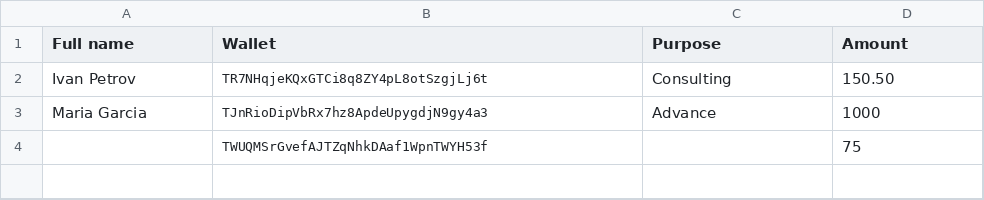
Payanvil reads your recipient list from a spreadsheet or a text file. Here's exactly what it expects.
What matters is the order of the columns — not their names. The header row can be in any language, or absent altogether.
So you don't have to rename anything or translate your existing register. Keep the columns in this order:
Supported formats: .xlsx, .csv and .txt.
Four columns, first sheet. The header row is skipped automatically.
Same four columns. The delimiter — ;, , or a tab — is detected automatically, so a file exported from any regional version of Excel just works.

The simplest option when you only have addresses and amounts: an address amount pair per record. A record ends at a line break or a semicolon ;, so you can keep one per line or put several in one line. The amount accepts both a dot and a comma: 150.50 or 150,50. Lines starting with # are treated as comments.
# payouts for July
TR7NHqjeKQxGTCi8q8ZY4pL8otSzgjLj6t  150,50
TJnRioDipVbRx7hz8ApdeUpygdjN9gy4a3  1000
TWUQMSrGvefAJTZqNhkDAaf1WpnTWYH53f 75; TR7NHqjeKQxGTCi8q8ZY4pL8otSzgjLj6t 20One typo doesn't cost you the whole file. Valid rows are accepted; every rejected row is reported with its line number, the reason and the offending value — so you know exactly what to fix.
| Reason | What it means |
|---|---|
| Invalid wallet address | Not a valid Tron (TRC-20) address — typo, wrong network, or stray characters |
| Invalid amount | The amount isn't a number |
| Amount is missing | The amount cell is empty |
| Wrong line format | .txt only: the line isn't an «address amount» pair |
The same reference is built into the app — press the ? button next to the file selector, and you'll get this page in your interface language.
← Back to home